
Are there some things that you have uploaded to a social medium that you don’t have stored anywhere else? Perhaps you are implicitly relying on Facebook and Twitter remaining operational so that all those funny comments, memorable photos, shared links and event calendars are not lost? If you have been following this blog for a …
Category: Storage
Jul 03 2010
Always Eject External Drives Before Removal

Over the course of my career where USB flash drives and external flash drives have become more commonplace (compared to the 1990s where floppy disks and compact discs were king) I have been shocked by the number of people that simply pull out a drive without first ejecting it. In some cases, this has lead …
Jun 08 2010
Recuva – Get a Second Chance After Emptying the Recycle Bin

Have you ever accidentally deleted one or more valuable files when you have been doing a tidy up on your computers and then watch that file disappear before before your very eyes never to return? Maybe you deleted the wrong photo off your camera or perhaps an important e-mail on your computer? I know I …
Jun 02 2010
Hard Drive Capacities – Know What You Are Getting!

Over the years, you may have wondered whether or not you have been duped when you bought a new computer with a hard drive of a higher capacity that your current computer or maybe when you just buy a new drive to put into your existing computer. The shop of manufacturer may advertising one capacity …
May 11 2010
Internet Explorer 9 Preview – Second Release
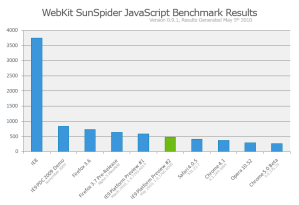
Microsoft quietly released its second update to the Internet Explorer 9 Preview. I gave an overview of the first release here if you want to get up to speed on how the original preview performed. From a look and feel perspective, it looks very much the same. All of the usual toolbars and menus are …
May 06 2010
SUPER – A Great Audio & Video Conversion Utility

Have you ever been caught in a situation where you need to have an audio or video file in a specific file? It could be one of those “just in case” things as you never know when you might need it. Anyway, I was caught in a situation this week where the CIO wanted to …